Software interface
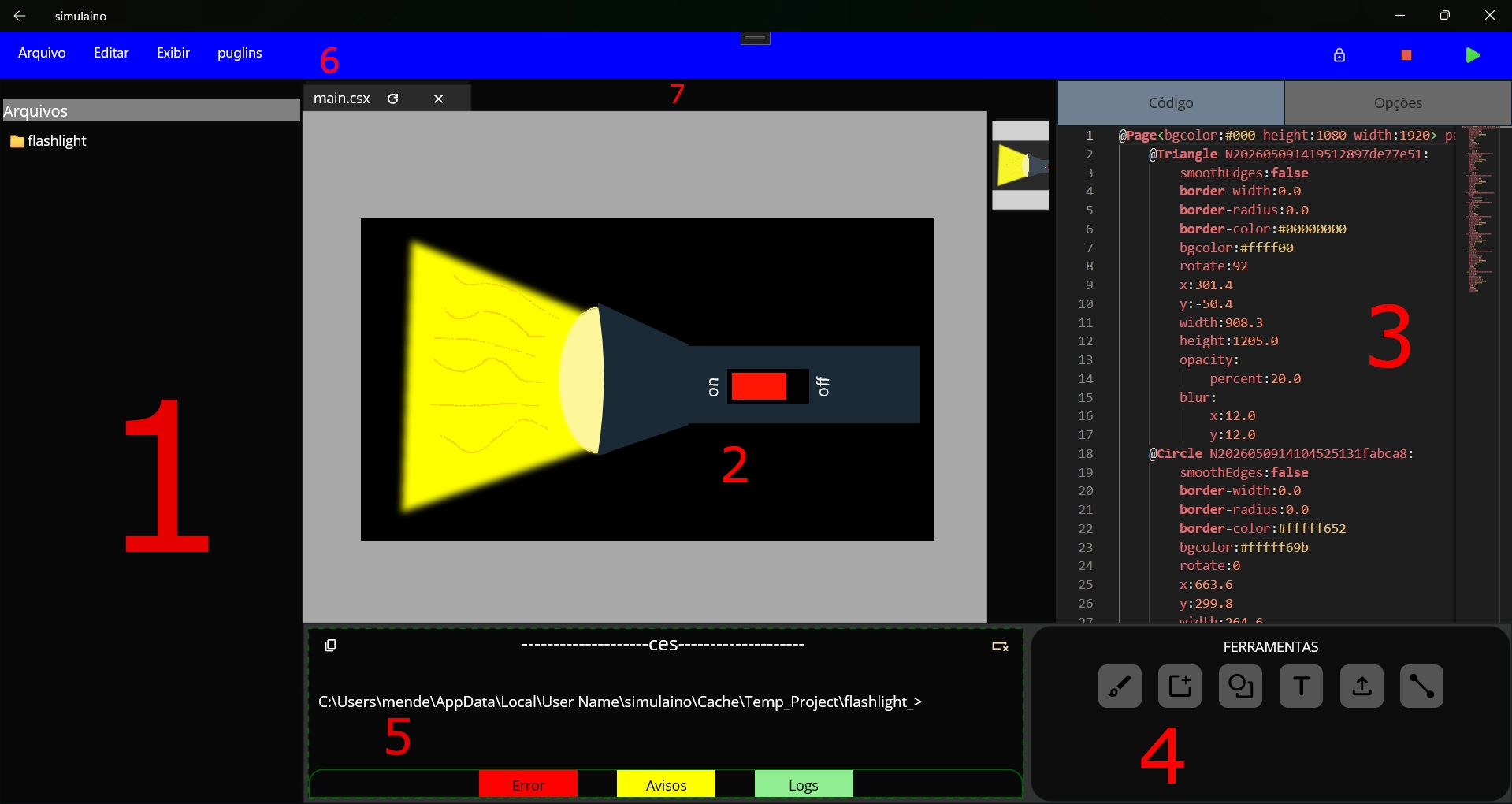
1. File Explorer
Used to manage files such as csx, ces, png, folder, and other files that the user may need to run the design or simulation.
2. Canvas
Area where shapes and visual elements are rendered.
3. Code Editor
Allows editing CSX and CES codes directly.
🚧 Under Development
This feature is under development and does not support visual extensions or color changes.
4. Tool Panel
Contains drawing and editing tools.
Main features:
- Text
- Shapes
- Images/Uploads
- Polygons
- New page
- Blush
5. Console
Displays logs, warnings and errors.
🚧 Under Development
This feature is not finished yet.
6. Menu Bar Items
Contains the main menus and shortcuts to save, edit, and create csx files.
- File
- Edit
- view
- Puglins ( ⚠️ Unavailable at the Moment)
🚧 Under Development
This feature is not finished yet.
7. Tabs
used to display the open files that can be rendered.